
Plugins › Texture and cinematic › Lunar

Lunar
Granular textures in key: two grain layers, mood dice and your own sounds.
For any DAW that loads VST3 on Windows. Mac follows in 2027.
| Presets | 70 |
| Layers | 2 |
| Sources | 12 + yours |
| Formats | VST3 · Windows |
| Version | 0.4.1 |
| Download | 2 MB |
Hear it
About
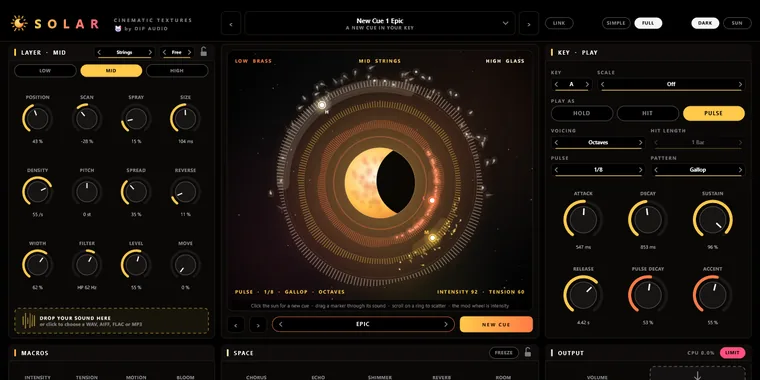
Lunar turns sound into texture. Two grain layers each read from one of twelve built-in sources, or from your own sound dropped onto the layer, and scatter grains that can follow your key and scale.
The moon view shows it happening: each layer's sound wraps around an orbit ring, a satellite marks where its grains read (drag it to move them), and the grains fly off as sparks. Click the moon for a NEW MOON, a fresh texture steered by a mood (Dark, Shimmer, Underwater, Space, Tension or Dreamy), with locks and a history to go back.
Drop in a vocal or a whole loop and Lunar asks what it's in: one note, or a key such as D minor, which it detects for you. Macros (Motion, Bloom, Colour and Drift), a body tone, chorus, echo, shimmer reverb and freeze finish the space, and DRAG AUDIO takes the last chord out as a WAV.
What's inside
- Two grain layers: 12 built-in sources or your own sound
- Grains in key and scale, free or in time
- NEW MOON in six moods, with locks and history
- Detects your sound's note or key
- Motion, Bloom, Colour and Drift macros
- Chorus, echo, shimmer reverb and freeze
- LINK to Inspire's key, and DRAG AUDIO
What's new
- Your own sound as a note or a key: Lunar hears that a loop is in D minor
- DARK is the default theme
- Knobs: Shift-drag for fine moves, double-click a value to type it, right-click to reset, copy or paste


Hear when Lunar is out.
One email on release day, with audio first. No spam.